AI Copilot
The AI Copilot is a design-time assistant built into Designer V3. It understands your current page type, active configuration section, and inspector focus — so suggestions and edits are context-aware rather than generic.
Open it from the Designer V3 toolbar: click AI Copilot.
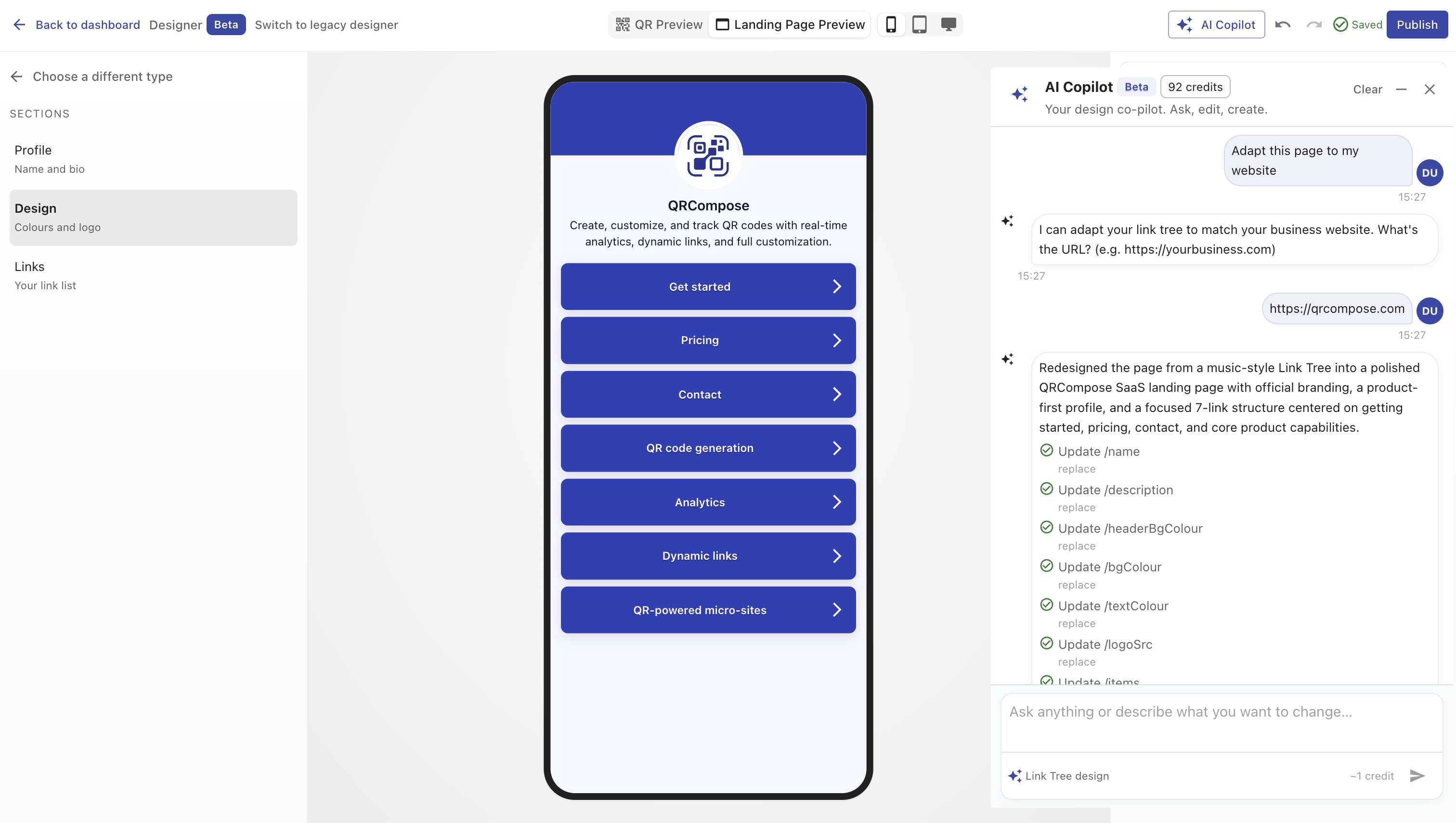
What it can help with
The copilot assists while you configure a design in the designer. Typical tasks include:
- Filling in content fields (titles, descriptions, link labels)
- Suggesting colour palettes and branding choices
- Structuring event agendas, speaker lists, or menu categories
- Adjusting form fields, booking options, or payment copy
- Answering questions about what a section does
Suggested prompts appear based on your design type — for example, Event designs surface agenda and speaker prompts, while Menu designs surface category and item prompts.
How context works
The copilot receives a snapshot of your current editor state:
- Design type (Link Tree, Event, Menu, Form, etc.)
- Active section in the left navigation
- Current field values and configuration version
- Inspector focus (which property you are editing)
This page-aware context means the assistant proposes changes that fit your actual configuration, not a blank template.
Applying changes
When the copilot suggests configuration changes, you review them before they are applied to your draft. Your existing autosave and undo/redo behaviour still applies — you can revert any change from the toolbar.
Availability and credits
AI Copilot availability depends on your subscription:
| Plan | AI credits |
|---|---|
| Free | Not included |
| Starter | 100/month |
| Advanced | 500/month |
| Pro | 2,000/month |
| Enterprise | Custom |
When credits are exhausted, the copilot shows an upgrade or wait-for-reset message. Credit usage is shared with the broader AI Builder platform.
AI Builder vs AI Copilot
| Feature | AI Copilot | AI Builder |
|---|---|---|
| Location | Inside Designer V3 toolbar | Designer → Build with AI (/designer/build) |
| Scope | Current page configuration | Full experience planning across multiple assets |
| Output | In-place config edits | Draft resources (pages, apps) for review |
Use the copilot for quick, page-level help. Use AI Builder when you want to plan and build a complete experience from a brief.
Related
- Designer V3 — workspace overview
- AI Builder — full build workspace
- Plans & Billing — AI credit allowances