Business Cards (vCard)
The vCard component in QRCompose lets you create a professional digital business card that can be shared instantly through a QR code.
It helps visitors save your contact details, connect with your social profiles, and access your key links - all through a beautifully styled, mobile-optimized interface.
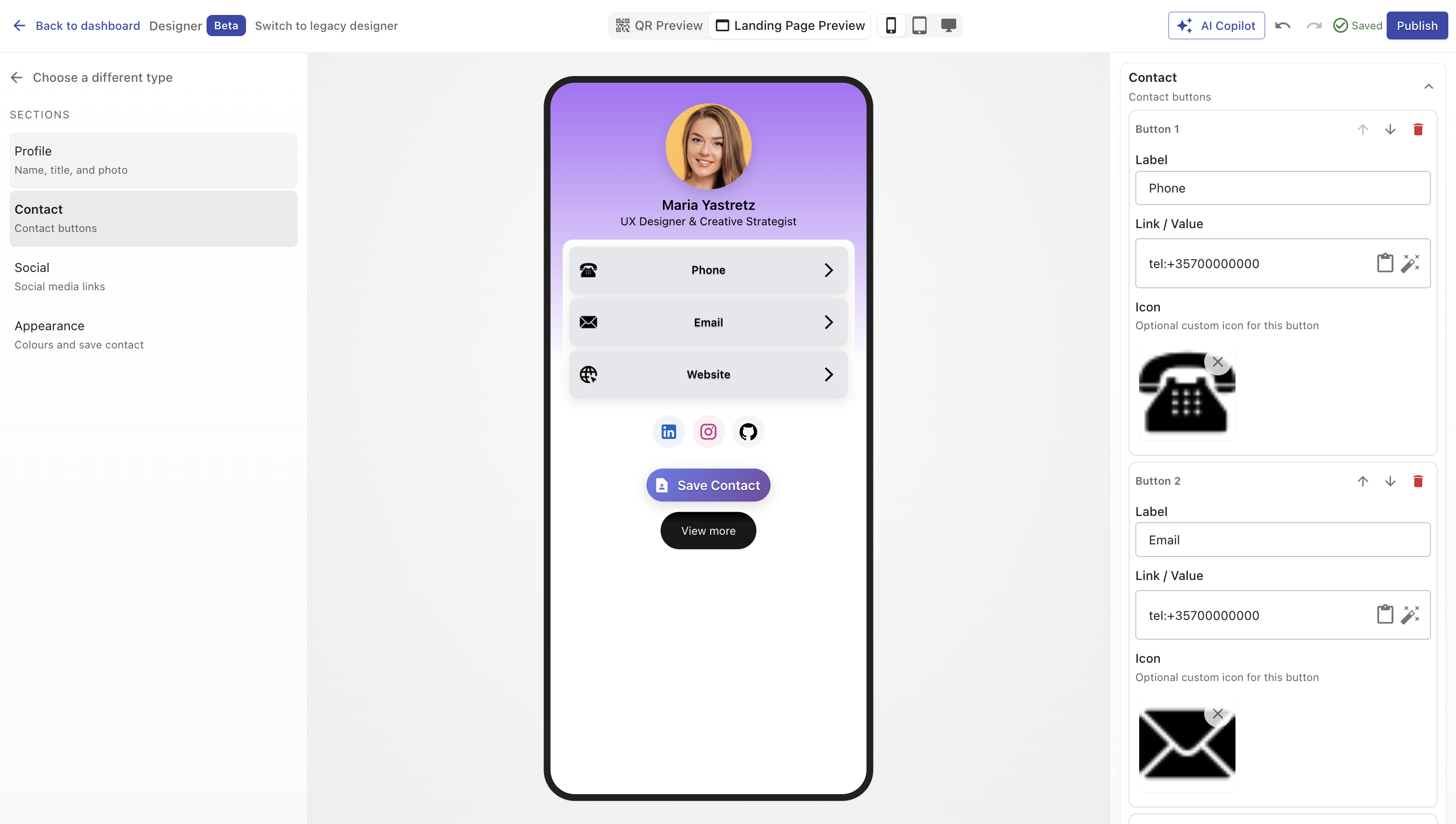
Overview
A vCard Page acts as your personal or company identity hub.
You can display your name, contact information, website links, social profiles, and even a call-to-action (CTA) button such as “Book a Call” or “Visit Website”.
Each card is fully customizable with colors, icons, and branding - turning a traditional contact card into an interactive digital experience.
Creating a Business Card
You can create a vCard in two ways:
- During QR Code creation - choose Page → Business Card in step 2.
- From the Page Library - select type Business Card in Designer V3 and configure it.
Once published, the card generates a dynamic, scannable link that users can open or save directly to their phone.
Configuration Sections
Main Properties
Set up your card’s identity and description.
| Field | Description |
|---|---|
| Name | The primary name displayed on the card (your name or company name). |
| Description / Title | Optional tagline or role description (e.g., Founder & CEO). |
Design
Customize the look and feel to match your brand.
| Option | Description |
|---|---|
| Color Presets | Apply predefined color themes for background and text. |
| Background Color | Choose a static or gradient background. |
| Text Color | Define contrast for all text elements. |
| Image / Logo | Upload a personal photo or company logo to display at the top. |
List of Information
Add one or more contact or information buttons (e.g., phone, email, portfolio link, download CV).
Each item supports:
- Label – visible text on the button (e.g., Email, Call, Portfolio).
- URL – target address (mailto:, tel:, or standard web URL).
- Icon – upload a small logo or icon for visual context.
- Background / Text Color – customize button appearance individually.
- Order Controls – move items up or down.
- Delete – remove any entry (confirmation shown if analytics data exists).
TIP
You can mix and match button types - for example:
- “Call” →
tel:+44123456789 - “Email” →
mailto:[email protected] - “Website” →
https://example.com
Socials
Attach your main social media profiles for quick connection.
| Platform | Field |
|---|---|
socialUrls.linkedIn | |
| X (Twitter) | socialUrls.x |
socialUrls.instagram | |
socialUrls.facebook | |
| YouTube | socialUrls.youtube |
| GitHub | socialUrls.gitHub |
All links are displayed as platform icons that open in new tabs when tapped.
Call-to-Action (CTA) Button
Encourage visitors to perform a key action - like scheduling a meeting, visiting your portfolio, or downloading a brochure.
| Field | Description |
|---|---|
| Show Button | Toggle visibility of the CTA button. |
| Label | The text shown on the button (e.g., “Contact Me”). |
| Redirect Link | URL the button should open. |
WARNING
If this page is part of an App and the CTA points to an external URL, the app will end there.
For a seamless experience, keep CTAs internal or use other components for multi-step flows.
Example Use Cases
- Personal branding: Share your professional profile with contact and social links.
- Corporate staff cards: Create standardized vCards for employees.
- Freelancers: Link to your portfolio, services, and contact details.
- Event networking: Let attendees scan and save your info instantly.
Analytics
Every interaction is tracked:
- Page views and unique visitors
- Button clicks (per link)
- Device and location data
Track how often people view or interact with your card directly in your analytics dashboard.
Best Practices
- Keep your card simple and clean - prioritize key links.
- Use clear button labels (“Call”, “Email”, “LinkedIn”).
- Maintain consistent icon colors and styles.
- Test all URLs before publishing.
- Avoid overloading with too many links (3–6 is ideal).
- Use a professional image or logo for credibility.
Summary
The vCard (Business Card) component gives you a modern, trackable way to share your identity.
With instant QR access, full design control, and integrated analytics, it replaces printed business cards with a dynamic, interactive experience - perfect for professionals, teams, and creators.