Menus
The Menu component in QRCompose lets you create fully interactive restaurant or product menus.
Menus are dynamic, customizable, and optimized for mobile - perfect for cafes, restaurants, food trucks, and product listings.
Overview
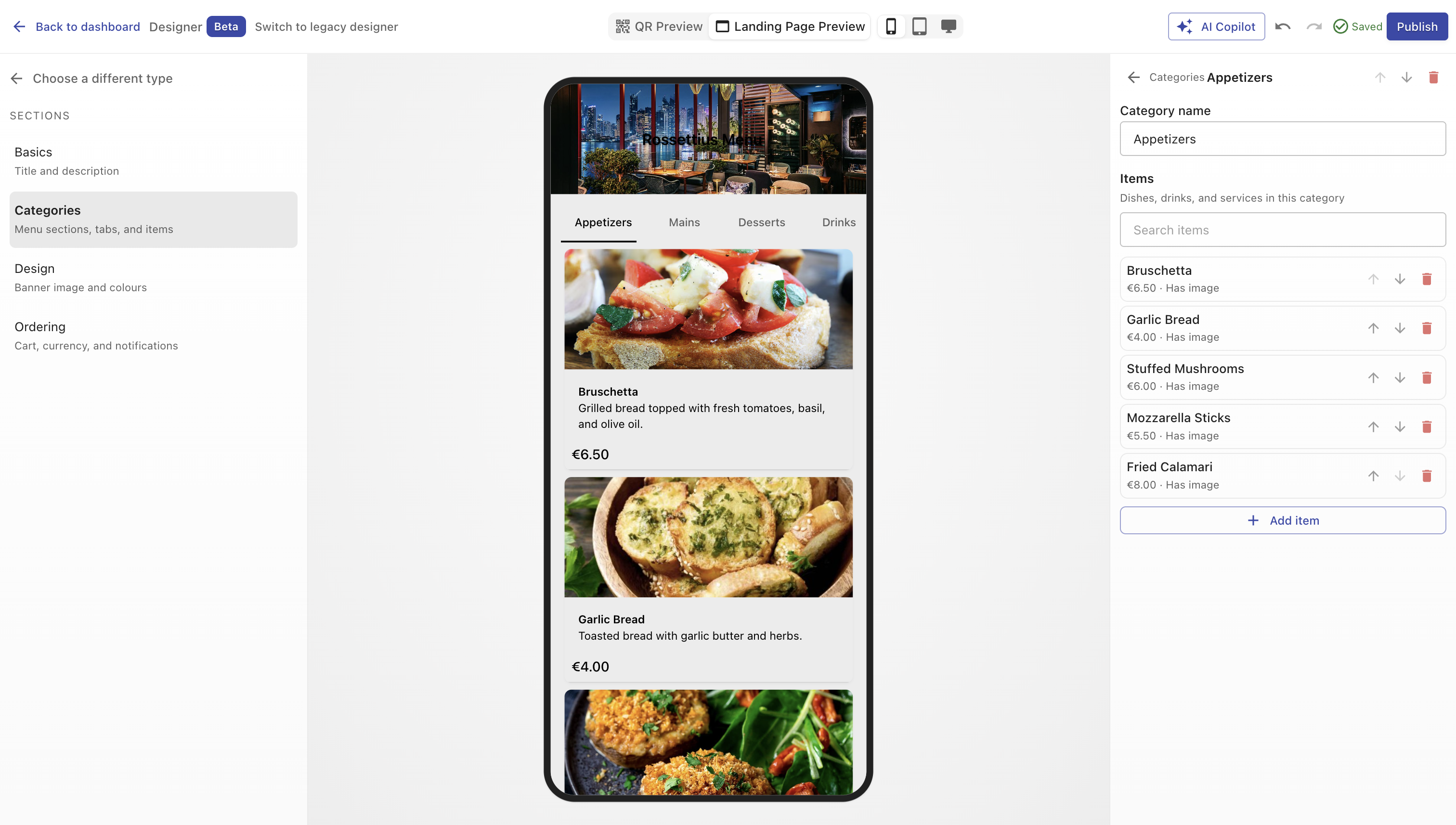
A Menu Page displays categories (like Starters, Mains, Desserts) and items within each category.
Each item can include:
- Name
- Description
- Price
- Image
Menus can be customized visually and optionally allow visitors to place orders directly through QRCompose.
Creating a Menu
- Open Designer → Create a design (
/designer) - Select Menu from the type picker (Popular group)
- Configure categories, items, and design sections
- Publish — requires Starter plan or higher
You can also edit existing menus from the Page Library. Link to a QR code or embed in an App (e.g., menu → payment → review).
Configuration Sections
Main Properties
Define your menu’s core information.
| Field | Description |
|---|---|
| Title | Internal name and menu heading shown to users. (Required) |
| Description | Short text displayed below the title (optional). |
| Currency | Select the pricing currency (EUR, USD, GBP, etc.). |
| Allow Visitors to Order | Enable in-app ordering. When enabled, users can add items to a cart and submit orders. |
| Metadata Labels | (Visible only if ordering is enabled) Add custom checkout fields such as “Table Number”, “Name”, “Notes”, etc. These labels appear in the checkout form for each order. |
Design
Control the visual appearance of your menu.
| Option | Description |
|---|---|
| Color Presets | Quickly apply a ready-made color palette for background and text. |
| Background Color | Solid or gradient background for the page. |
| Text Color | Text color for titles, prices, and descriptions. |
| Image / Logo | Upload a brand logo or cover image shown at the top of the menu. |
Categories & Items
Organize your content into categories with items.
Categories
- Add or rename categories such as “Starters”, “Main Course”, “Desserts”.
- Each category can contain multiple menu items.
- Reorder or delete categories anytime (deletion prompts a confirmation if analytics exist).
- Add new categories using the “Add Category” button.
Items
Inside each category, you can add menu items.
| Field | Description |
|---|---|
| Item Name | The name of the dish or product. |
| Description | Optional detailed text about the item. |
| Price | Numerical value (automatically formatted to the selected currency). |
| Image | Upload a photo of the item. |
| Reorder Controls | Move items up or down within the category. |
| Delete | Remove an item (confirmation shown if it already has analytics data). |
TIP
Click inside the “Add item” field at the bottom of a category to quickly add a new item.
Ordering Mode
When Allow Visitors to Order is enabled:
- Each menu item displays an “Add to Cart” button.
- A floating cart icon (FAB) appears for easy checkout.
- Visitors can review their selections and complete the order form.
- Metadata labels (like Table Number or Customer Name) appear at checkout.
Orders can later be viewed and exported from the dashboard.
Analytics
Every interaction is logged, giving you:
- Views per category and item
- Clicks and orders
- Conversion metrics
- Device and location insights
All analytics are visible in real-time within your dashboard.
Example Use Cases
- Restaurant Menu - showcase dishes with photos and prices, enable instant table ordering.
- Food Truck - update daily items without reprinting QR codes.
- Retail Catalog - display product lists with descriptions and checkout links.
- Service Menu - for salons, barbershops, or repair services with price lists.
Best Practices
- Keep category names clear and concise.
- Use high-quality, well-lit images (1:1 ratio recommended).
- Limit long descriptions for faster scanning.
- Test your menu on multiple screen sizes.
- When enabling orders, add clear metadata labels (like “Table No.”) to avoid confusion.
- Always verify currency and pricing accuracy before publishing.
Summary
The Menu component transforms traditional printed menus into fully digital, interactive experiences.
It adapts to any business - from restaurants to service providers - giving users control over design, ordering, and analytics, all powered by dynamic QR codes.