Reviews
The Reviews component in QRCompose lets you gather customer feedback directly from QR scans - privately or publicly - with full control over how each type of sentiment is handled.
You can collect feedback internally, redirect happy customers to external platforms (like Google Reviews or Tripadvisor), and analyze results in real time.
Overview
A Review Page helps you:
- Collect direct feedback or star ratings.
- Control which feedback stays private (internal) and which redirects users externally.
- Protect your public reputation by guiding negative experiences to private channels.
- Analyze responses through QRCompose analytics.
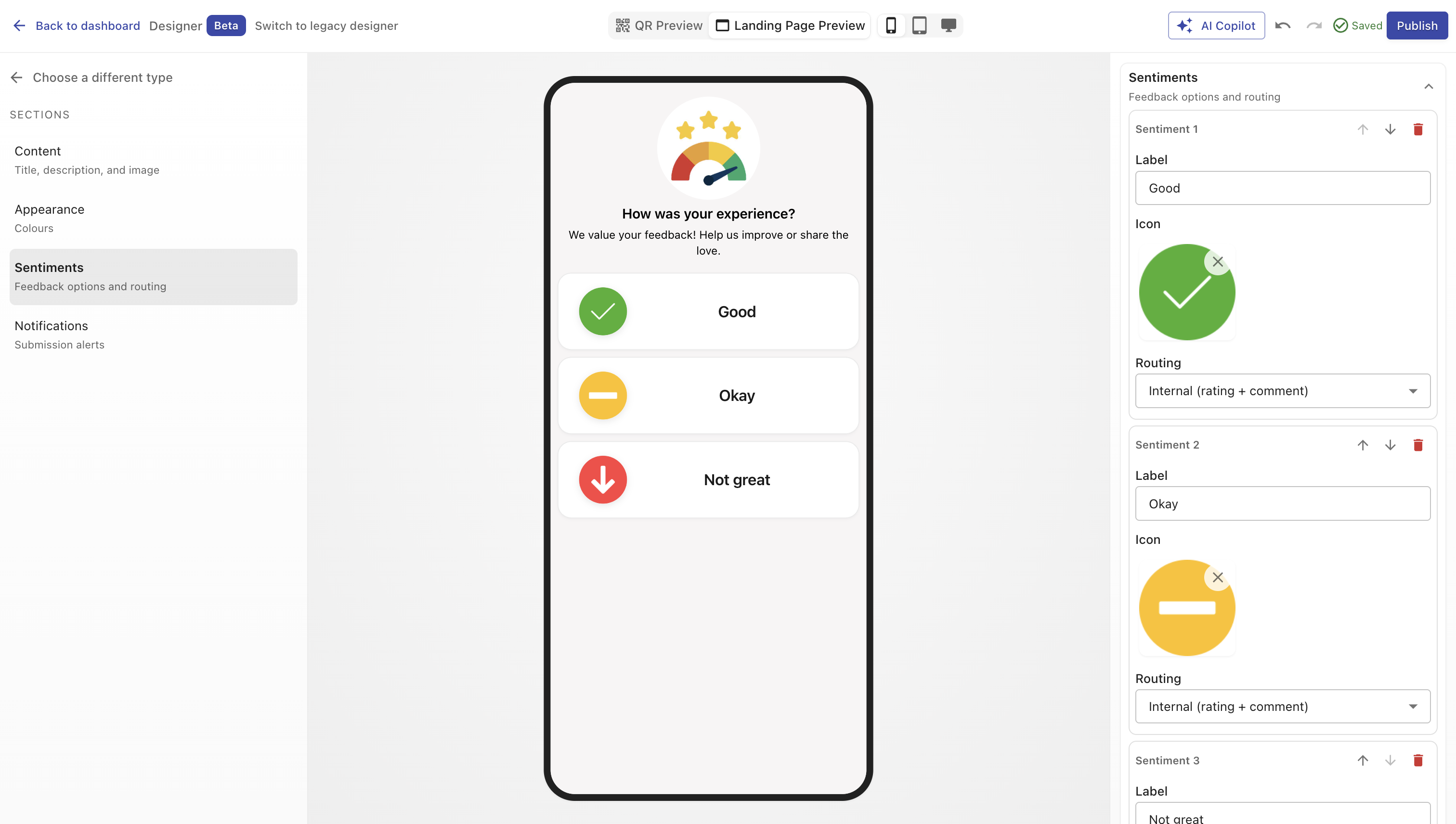
You can define multiple sentiments (for example, Happy, Neutral, Unhappy) - each with its own logic, icon, and optional redirect behavior.
Creating a Review Page
You can create a review page in two ways:
- When creating a QR Code - select Page → Reviews as the destination type.
- From the Page Library - select type Reviews in Designer V3 and configure your feedback logic.
Once published, you can link it to any QR code or include it within an App (e.g., Payment → Review → Thank You).
Configuration Sections
Main Properties
Define your page’s title, description, and feedback logic.
| Field | Description |
|---|---|
| Name | Internal name and page heading shown to visitors. (Required) |
| Description | Optional short introduction or thank-you message. |
| Sentiments | Define individual feedback options (e.g., Excellent, Okay, Poor). Each sentiment can have its own icon and action. |
Sentiments
Each sentiment represents a feedback option your user can tap. You can add as many as you like.
Sentiment Fields
| Field | Description |
|---|---|
| Label | The visible text for this sentiment (e.g., “Great service”). |
| Action Type | Choose between Internal or External actions. |
| Icon / Image | Upload a small image or emoji-style icon for visual clarity. |
| Order Controls | Move sentiments up or down to adjust display order. |
| Delete | Remove a sentiment (confirmation appears if it has analytics data). |
Action Types
Internal
- Feedback is captured privately inside QRCompose.
- Responses are visible only in your dashboard.
- Ideal for negative or neutral feedback to identify improvement areas.
External
- Redirects users to a public review platform like Google Reviews, Tripadvisor, or Yelp.
- Helps promote your brand when customers are happy.
You can also specify a Custom URL for any review system not listed.
External Review Settings
When a sentiment is set to External, additional settings appear:
| Field | Description |
|---|---|
| External Platform | Choose between Google Reviews, Tripadvisor, Yelp, or Custom. |
| Business Search (Google) | If Google is selected, search your business name to automatically generate the correct review link using the Google Places API. |
| Custom URL | Enter your own destination URL for other platforms or survey tools. |
Example
If a user selects “Loved it!”, you can automatically redirect them to your Google Review page.
If they select “Not satisfied”, you can capture their feedback privately.
Design
Customize how your review page looks.
| Option | Description |
|---|---|
| Color Presets | Apply a ready-made color palette. |
| Background Color | Solid or gradient background for the page. |
| Text Color | Adjusts contrast for labels and buttons. |
| Image / Logo | Optional branding image or header. |
Analytics
Every interaction is tracked in real time:
- Total feedback received
- Sentiment distribution (positive, neutral, negative)
- Device and location data
- Conversion or redirection analytics (for external reviews)
Example Use Cases
- Hospitality: Encourage guests to leave Google Reviews when happy, collect internal feedback when not.
- E-commerce: Gather post-purchase ratings and testimonials.
- Events: Measure attendee satisfaction.
- Services: Capture private improvement feedback while promoting positive reviews publicly.
Best Practices
- Limit to 3–5 sentiments for clarity.
- Use intuitive labels (“Great”, “Okay”, “Needs Improvement”).
- Always include an Internal option for constructive feedback.
- Upload consistent icon styles for a professional appearance.
- Test redirection links before publishing.
- Pair with Payments or Menus in an App for post-interaction reviews.
Summary
The Reviews component gives you total control over how customer feedback is captured, displayed, and leveraged.
It helps you protect your reputation by collecting internal feedback privately and channeling satisfied customers to public platforms - all with real-time analytics and flexible design customization.