Business Pages
The Business Page component allows you to create a complete digital profile for your business - including working hours, contact information, photo galleries, and a call-to-action button.
It’s ideal for restaurants, salons, hotels, retail stores, or service providers who want a simple but powerful mini-website accessible instantly through a QR code.
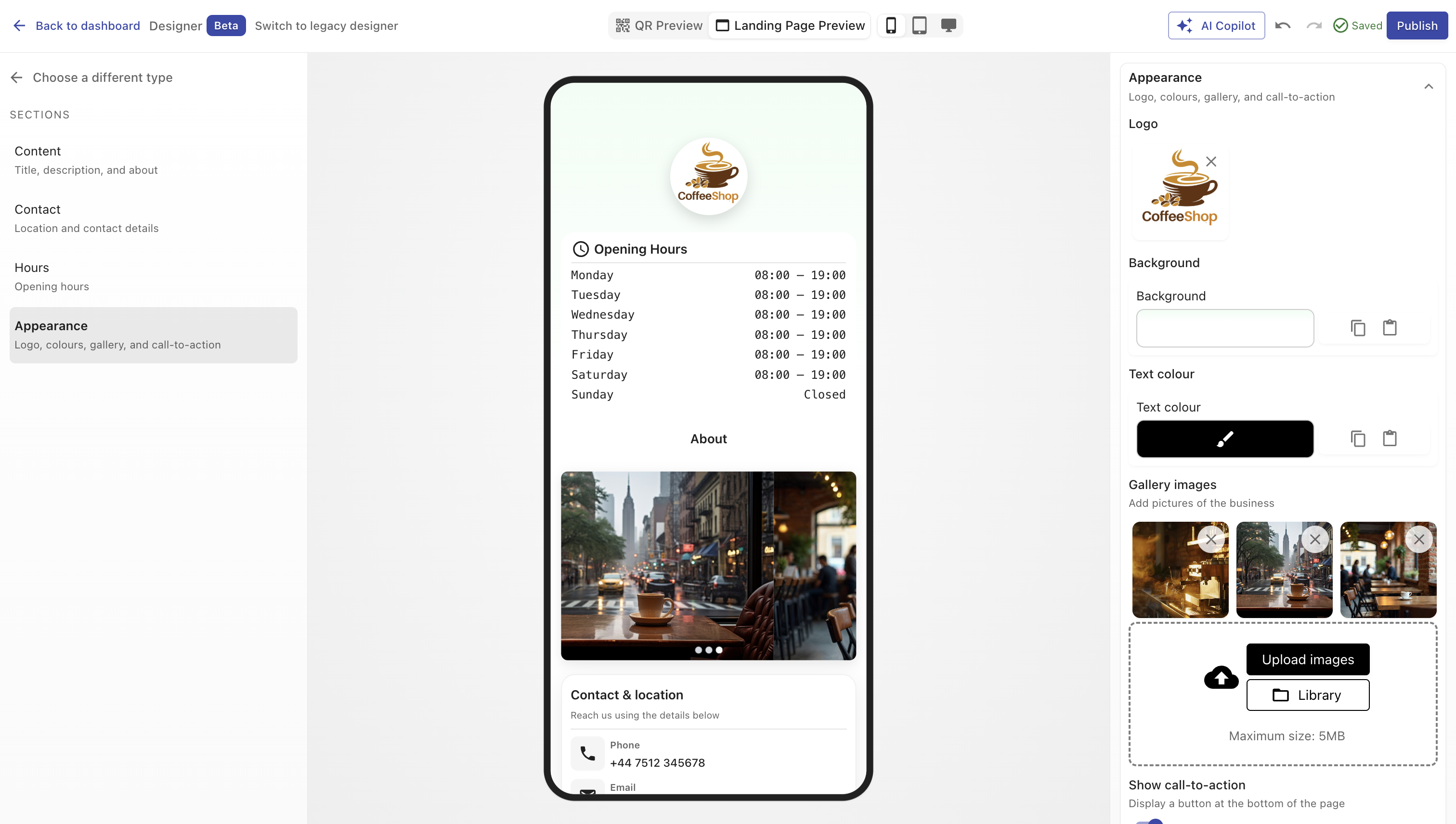
Overview
A Business Page acts as a single-page microsite hosted by QRCompose.
You can display your brand identity, describe services, showcase photos, and let customers contact or locate you - all in one scannable experience.
Each Business Page includes:
- A customizable design theme
- About section with contact details
- Working hours
- Gallery
- CTA button for external or flow navigation
Creating a Business Page
You can create one in two ways:
- When creating a QR Code - select Page → Business Page in Step 2.
- From the Page Library - select type Business Page in Designer V3, configure it, and publish.
Once published, you can link it to a QR code or include it in an App (e.g., Business Page → Form → Payment).
Configuration Sections
Main Properties
Define the basic details of your page.
| Field | Description |
|---|---|
| Name | Internal title and public heading displayed at the top. (Required) |
| Description | Short tagline or business summary shown below the title. |
Design
Style your page to match your branding.
| Option | Description |
|---|---|
| Color Presets | Apply a predefined color theme instantly. |
| Background Color | Choose a static or gradient background. |
| Text Color | Set the global text color for readability. |
| Logo / Image | Upload your logo or cover image to personalize the top section. |
Working Hours
Display your business’s operating times.
You can configure opening and closing hours for each day or mark the business as closed.
Each day includes:
- Open From and Open To time fields
- Closed checkbox to mark non-operational days
Supported Days: Monday → Sunday.
Example:
| Day | From | To | Closed |
|---|---|---|---|
| Monday | 09:00 | 17:00 | ☐ |
| Sunday | - | - | ☑ |
About Section
Describe your business and add key contact details.
| Field | Description |
|---|---|
| Contact Name | Person or department customers should reach. |
| About the Business | Brief description of services or offerings. |
| Phone | One or more contact numbers. |
| Customer service or booking email address. | |
| Website | Official website URL. |
Location Details
Include where you operate:
- Location Name – e.g., “Downtown Branch”
- Address – street and area information
- Map Link – direct link to Google Maps or other map services
Image Gallery
Showcase your space, team, or products.
| Field | Description |
|---|---|
| Gallery Images | Upload multiple images. Supports drag-and-drop, reordering, and removal. |
Images are displayed in a responsive grid layout that adapts to screen size.
Call-to-Action (CTA) Button
Encourage visitors to take the next step.
| Field | Description |
|---|---|
| Show Button | Toggle to display or hide the button. |
| Label | Text shown on the button (e.g., “Book Now”, “Visit Website”). |
| Redirect Link | URL the button points to (internal or external). |
WARNING
If this page is part of an App and the CTA points to an external website, the app will stop there.
For smoother experiences, keep CTA links within QRCompose flows whenever possible.
Example Use Cases
- Local business: Display address, contact info, and operating hours.
- Restaurant: Showcase images, menu link, and “Book a Table” button.
- Salon or spa: Present services, staff photos, and booking link.
- Retail store: Add product photos and “Shop Online” CTA.
Analytics
Every visit is automatically tracked:
- Page views and unique visitors
- Device and location statistics
- CTA button clicks
- Gallery interactions
View detailed metrics inside your analytics dashboard.
Best Practices
- Keep your About section concise.
- Use high-quality, square images for consistency.
- Keep working hours accurate and up to date.
- Avoid too many CTAs - one strong action is better than many.
- Test your links before publishing.
- If part of an App, ensure CTA redirects don’t break navigation.
Summary
The Business Page component transforms a static QR into a complete online profile - combining design, information, contact, and engagement tools.
It’s the perfect digital hub for small businesses and service providers looking for a fast, modern, and trackable web presence.